
 Arabic
  English
  Chinese
  Japanese
  Russian
  Spanish
  German
  French
  Hindi
Hindi Download Engineering & Simulation 1.2.0 for Windows
Free download NTCL Soft Section view Quantity Take-Off tool 1.2.0 full version standalone offline installer for Windows PC,
NTCL Soft Section view Quantity Take-Off tool Overview
This software is a smart extension designed for Autodesk Civil 3D users who work with corridor modeling, material takeoffs, and quantity estimation. It enables quick and precise extraction of lengths, areas, and other parameters directly from section views. By automating repetitive manual measurements, the tool streamlines the workflow of engineers, designers, and contractors working on civil projects. It also integrates seamlessly with Excel, allowing for efficient exporting and editing of data.Features of NTCL Soft Section view Quantity Take-Off tool
The tool brings multiple advanced features that simplify the process of calculating and managing section view data. It allows users to compute both linear and area quantities from various AutoCAD and Civil 3D objects.
Calculate length and area from AutoCAD objects for each section view.
Measure data from Civil 3D corridor points, links, and shapes, including surface comparisons.
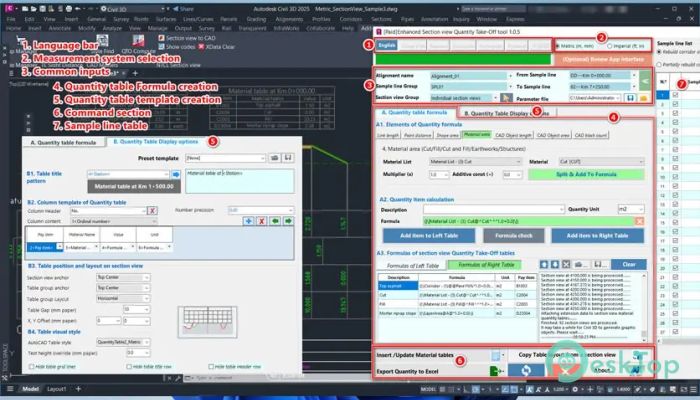
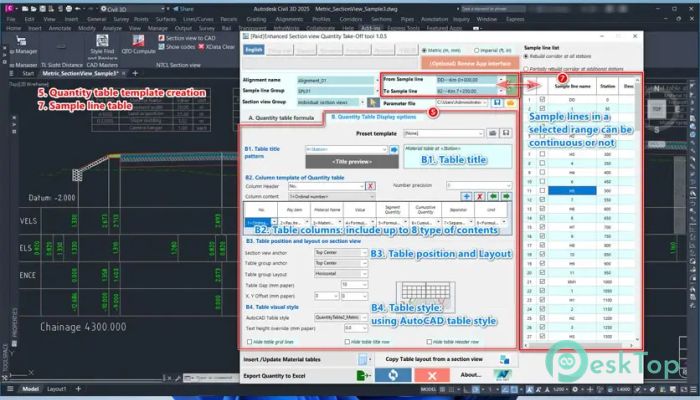
Generate editable material quantity tables directly within section views.
Export quantity data to Excel for easy reporting and customization.
Use mathematical formulas (+, –, ×, ÷) within quantity tables for dynamic calculations.
Save and reuse table templates with embedded formulas to save time on future projects.
Include custom subassemblies, such as Stripping Benching and Daylight Bench Quarter Cone, for advanced design cases.
Support for both metric and imperial measurement systems.
Custom Subassemblies
The software provides. NET-based custom subassemblies that help in handling complex section view designs. These subassemblies enhance flexibility, allowing users to create accurate and detailed models with minimal manual adjustments.
Stripping Benching: Build stripping areas with or without benching in cut-fill conditions. Target corridor surfaces or feature lines for accurate modeling.
Daylight Bench QuarterCone: Design multi-bench daylight slopes with variable cut/fill slopes and bench widths. Users can linearly vary slope values from the start to the end of a region.
Additional Tools and Enhancements
Beyond quantity take-offs, the application also offers extended functionality for managing Civil 3D data and visualizing geometry in new ways.
Convert section view polylines to TIN surfaces or 3D polylines in plan view.
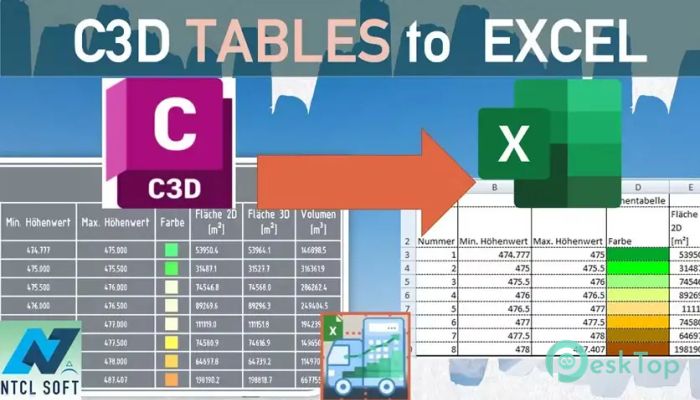
Export Civil 3D table contents directly into Excel files.
Non-destructively explode Civil 3D objects (section views, corridors, etc.) into AutoCAD entities while preserving original data.
Extract polylines from corridor links or shapes based on predefined codes.
Label points, links, and shapes directly on corridor sections in selected section views.
Support for Data Shortcut alignment, ensuring coordination across multiple files.
Automatically add sample lines and station values to improve section accuracy.
Localized app interface available in seven languages for international users.
Practical Use in Civil Projects
This utility plays a crucial role in infrastructure design projects, including roads, railways, drainage systems, and site grading. It enables engineers to generate accurate quantity reports, which are essential for cost estimation and progress monitoring. Since all data can be exported to Excel, stakeholders can analyze and share results easily across teams.
The automation of repetitive calculations allows designers to focus on more critical engineering tasks rather than manual data handling. This results in reduced errors, better consistency, and faster project delivery times.
User Experience and Interface
The software features a clean, intuitive interface that is integrated directly into Autodesk Civil 3D. The dialog boxes and options are neatly arranged, ensuring a minimal learning curve even for new users. With multi-language support, professionals from different regions can work efficiently in their preferred language.
The ability to customize templates and formulas adds flexibility for various project requirements. Users can define formulas, set units, and adjust output formats to align with organizational standards.
Benefits of Using the Tool
Adopting this tool provides several practical advantages for construction and engineering professionals.
Speeds up quantity extraction and reduces calculation time.
Eliminates manual measurement errors in section view data.
Ensures consistent and repeatable results across multiple projects.
Enables quick Excel exports for reporting and documentation.
Improves collaboration between design, cost, and management teams.
Integration with Civil 3D
The plugin integrates perfectly within Autodesk Civil 3D, ensuring that all calculations remain synchronized with model data. It supports various Civil 3D objects, such as corridors, alignments, and surfaces, providing seamless interaction across project elements. The conversion features for polylines, TIN surfaces, and shapes help maintain accurate geometry data across different design stages.
Efficiency in Data Handling
Instead of manually exporting tables or redrawing sections, the application automates these repetitive tasks. Its ability to convert and extract data quickly minimizes user effort. Engineers can instantly visualize, calculate, and export quantities, ensuring no data is missed. This boosts productivity and accuracy during both design and documentation phases.
System Requirements and Technical Details
Operating System: Windows 11 / 10 / 8.1 / 7
Processor: Minimum 1 GHz Processor (2.4 GHz recommended)
RAM: 2GB (4GB or more recommended)
Free Hard Disk Space: 200MB or more is recommended
Autodesk Civil 3D: 2026 , 2025 , 2024 , 2023 , 2022 , 2021

-
Program size29.27 MB
-
Version1.2.0
-
Program languagemultilanguage
-
Last updatedBefore 9 Days
-
Downloads24
 Altium Designer Agile
  NTCL Soft Section view Quantity Take-Off tool
 NTCL Soft Sheet set to or from Excel - Lite
 ZWCAD MFG
 Symetri Naviate Suite for Autodesk Revit
 Practical Groundwater AnAqSim